 The Wallet Shoppe

Looking to carry photos of your loved ones in your wallet? Real, physical ones, not just whatever is on your phone? Well, what size is a wallet photo, anyway?
If you’re looking to print wallet photos to keep in your wallet, or if you’ve got options for (say) school photos that ask you if you want “wallet-size photos” you may be confused what exactly that means.
No worries - we’ve got you covered!
What Size is a Wallet Photo?
There is no “official” standard for wallet photo sizes (unlike passports, more on that later). Nevertheless, most photo printers have settled on two sizes (a few also sell mini and die-cut versions).
Wallet-Size Picture in Inches
Both of these are referred to as “wallet sized”, and both are perfectly fit for purpose: 2 inches by 3 inches, and 2.5 inches by 3.5 inches.
Why Two Sizes?
Some printing services supply four pictures in a 2 x 2 grid on a larger sheet. Pretty simple reason - its cheaper to have printers set up with a standard print size, and use for multiple size prints.
2 inches by 3 inches
For example, if you have a printer set up to print a 4 x 6 inch standard size photo, you can immediately use this to print a grid of four 2 inch x 3 inch “wallet sized” photos on the same size paper.
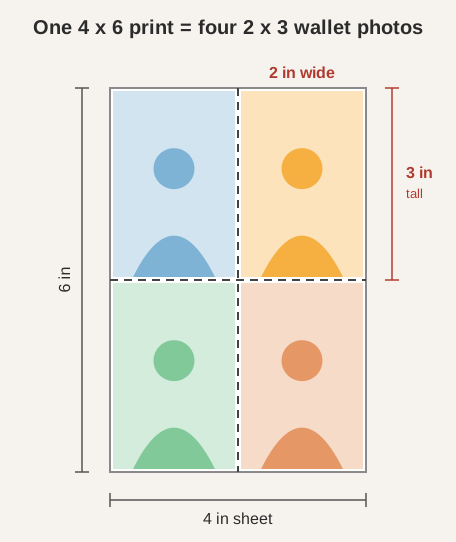
No need to have another printer set up, no need to change the paper in the printer. Simple huh?
2.5 inches by 3.5 inches (also called 2R)
But 4 x 6 inches isn’t the only standard size offering.
Some sites will offer 5 by 7 inches as a regular print. Simple math (sorry, we never promised there would be no math) says that means you can now offer a grid of 2.5 inch by 3.5 inch photos that are also pretty much “wallet sized”.
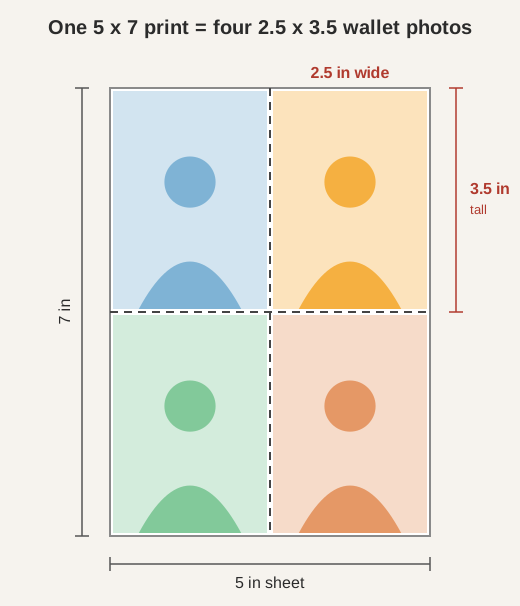
I mean, what is “wallet sized” pretty much depends on the size of the wallet, right?
So Which “Wallet Size” Photos Should You Choose?
Does it matter which size you choose?
Well, it does matter somewhat if you’ve gone down the minimalist wallet route (and we think you should).
So :
If You Have a Minimalist, Card-holder Size Wallet
In this case, you want wallet photos that are 2 by 3 inches (to fit in, say, a Ridge Wallet that measures 3.4 x 2.13 inches). Keep it in the card stack or a sleeve, though: a loose print will jam a pop-up card mechanism.
If You Have a Regular Bifold
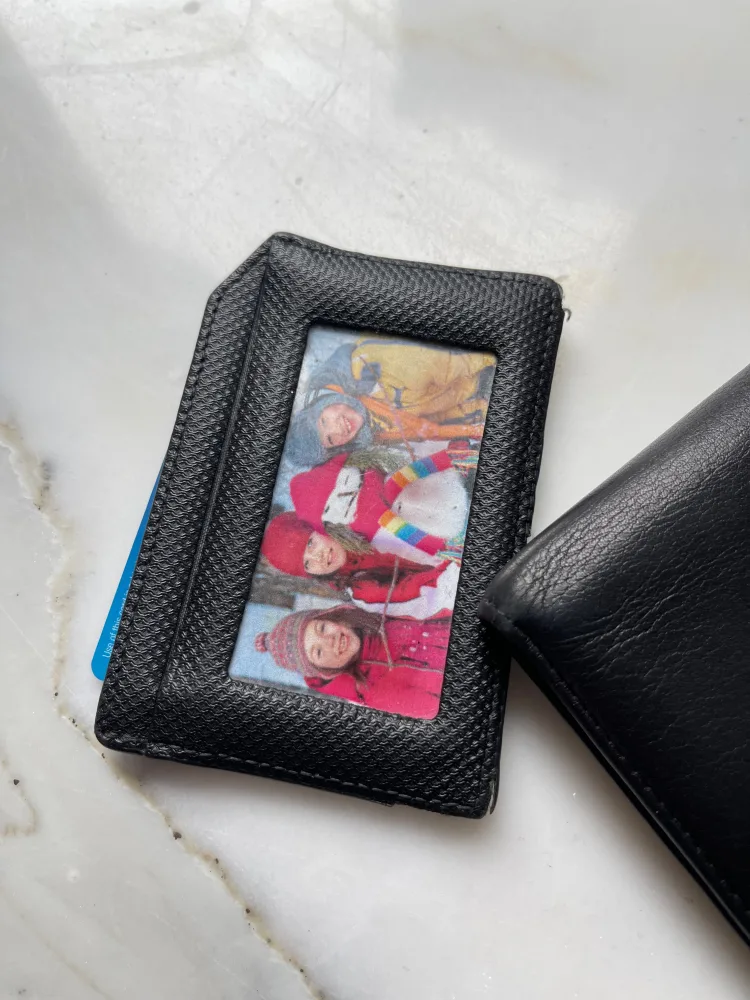
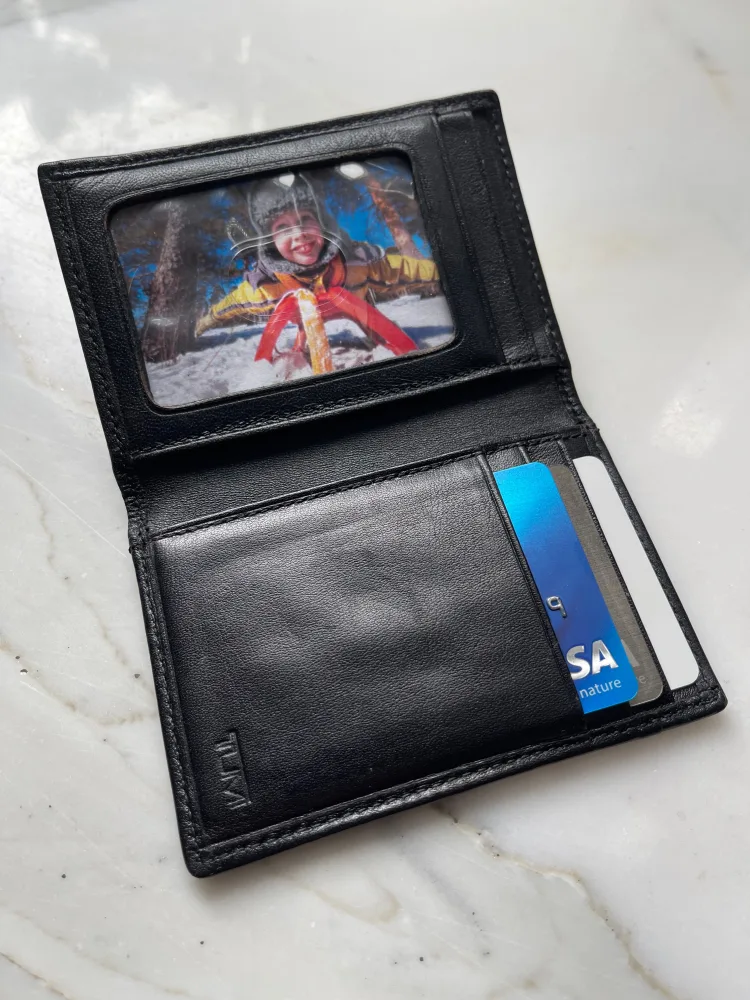
With one of these more traditional wallets, you can go a little larger and get wallet photos that are 2.5 by 3.5 inches. If your photo pocket has a clear window, check that its border won’t cover anyone’s face.
Note that these won’t go in a credit card slot (credit cards are 3.4 inches wide by 2.1 inches tall) so if that’s where you’re planning to store them, go for the smaller size.
Are “Wallet Size” and “Passport Size” the Same Thing?
You might quite reasonably think that “passport size” photos would be one of the two sizes above, right? Wrong - that would be too easy!
- U.S. passport size photos are 2 inches by 2 inches!
Of course, they have to be different…
Passport photos also have a lot of other, very specific requirements (background, head position, and image quality). You can find the full requirements here.
Where Can I Get “Wallet Size” Photos Printed?
Any copy shop will be able to do this, and most pharmacies too. Here are a few examples:
- Walgreens supplies four 2 x 3 inch images on one sheet.
- Nations Photo Lab offers standard 2.5 x 3.5 inch prints, plus mini and die-cut versions in different sizes.
- Walmart’s wallet-print listing describes 2 x 3 inch images, though the page also shows a different size label, so check the order preview.
Can I Print Wallet Size Photos?
If you have your own photo-quality printer, absolutely you can print wallet size photos yourself. You’ll also need:
-
Photo-quality paper, in either glossy or matte
-
A pair of sharp scissors!
The steps:
-
Select the photo and crop it to a 2:3 ratio for a 2 x 3 inch print, or 5:7 for a 2.5 x 3.5 inch print. Check that everyone still fits in the frame.
-
In your photo or page-layout software, set the image’s physical print dimensions. Menus vary, so look for measurements rather than relying on a “wallet” preset.
-
Arrange the images on the paper with room for trimming. Four 2 x 3 images fill a 4 x 6 sheet only if the printer supports that layout without unprintable margins.
-
Print a prepared layout at actual size or 100%. “Fit to page” can change the dimensions, and borderless settings can enlarge and crop the picture.
-
Make a plain-paper test and measure it with a ruler before using photo paper. Let the final print dry as directed before cutting.
-
Cut the picture (or pictures) out carefully since there will be a lot of empty space around the print. This is harder than it sounds. Or is it just me that can’t cut straight?
Depending on how familiar you are with using the printing options for your computer, the printing step above will either be really straightforward, or extremely annoying! The video below may help.
Before You Go…
Thanks for reading! Keeping a picture in your wallet is a time-honored tradition, and doesn’t require batteries! But there are a lot of other things people carry in their wallet - check out our next article (with a title you’re sure to recognize …)
Bonus Video
FAQs
Is a 2 x 2 Photo “Wallet Size”?
Most print shops will use either 3 by 2 inches, or 3.5 by 2.5 inches as “wallet size” (2 by 2 inches is “passport size”). There’s nothing stopping you from using a 2 by 2 photo in your wallet, but it may look a bit small.
Is a 4x6 Photo a Wallet Size?
No, that’s too large for a wallet. However, if you order “wallet size” prints, you will typically get something like a 4x6 inch print, with four 2x3 inch (wallet-size) images arranged in grid.
What Size Are Walgreens Wallet Photos?
Walgreens prints 2 x 3 inch wallet photos.


